
Sometimes, you can’t get into the rental to get professional photos – or more accurately, you don’t care to have your photos taken while the tenant’s stuff is all over the place. It’s okay, we understand. Although we can’t work the magic that we do when we’re in there with our equipment, that doesn’t mean we can’t help make your photos look as good as possible. Just let us know and we’ll happily do our best to make your photos look as good as possible, from basic things like straightening to white balance, colour correction, shadow enhancement, and so on.
Take a look at some examples of enhanced photos and see the difference:
Cleaning the Kitchen


A photo should, as much as possible, be an accurate representation of what the room looks like when you’re standing in it. It also should show the property in the best light possible – after all, you’re using this photo to market your place and attract the best possible tenant at the best possible price. The yellow tint is a result of incorrect white balance adjustment, we fixed that. The photo was taken with the camera angled down, resulting in what is called vertical distortion – it looks a bit like the walls are caving in. You may not notice it immediately, but your brain registers that ‘something is off’ subconsciously… not something you want potential tenants to feel! Finally, as much as possible we tried to reduce the shadows. When we’re on site taking photos, we can use RAW image data plus a technique called HDR photography to really show the kitchen as your eye sees it, but in this case we were still able to reduce the unrealistic shadows and make a more inviting-looking kitchen.
Brighten Up


Most likely the landlord was wanting to show off a nice, bright living room with sunlight streaming in. Unfortunately, the result is the opposite with a blown out (i.e. too bright) doorway and dark room. You can’t see out AND you can’t see in. Some adjustments allow us to recover some of the detail lost in the shadows and a tiny bit in the doorway as well.
Easy on the Yellow

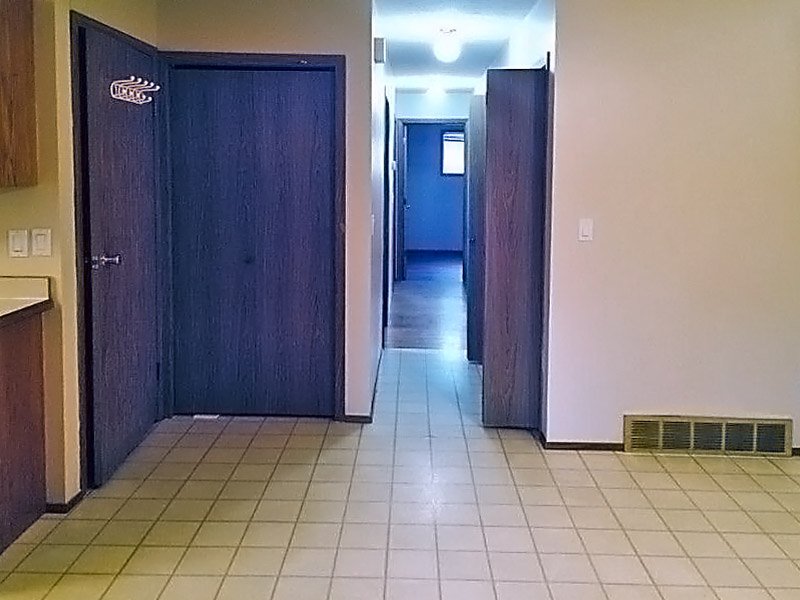
The original image is a bit blurry, so we added some sharpening to bring out more of the wood grain. And again, incorrect white balance makes a room look dated and unclean. And If you don’t see it on the original, look more closely at a light switch all by itself from the original (we haven’t done any edits on this) below.
 When you see it by itself you would never guess that this is white! Your brain does an amazing job of knowing what colours things are relative to what’s around and the lighting in that room, but cameras are not as good at it. Remember that blue or gold dress? That’s the same thing – your brain is either compensating for lighting or it’s not. But either way, be assured that even if you didn’t notice how yellow the original photo was, it does give the room a less clean look.
Put Away Your Toys


This is actually a photo that we took – unfortunately, the tenants had a lot of stuff in the backyard that we didn’t have permission to touch. So to help out this landlord, we digitally removed a few of the items to show what the yard looks like empty (as it would be when the new tenant moves in).